
User`s guide




Using the Control Panel Menu 119
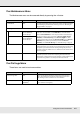
The Preference Menu
indicates default settings.
The Reset All Settings Menu
Item Parameter Explanation
Date And Time MM/DD/YY HH:MM Set the printer’s built-in clock. The time provided by the clock is
used when printing logs and status sheets.
Language Japanese Select the language used in the control panel display.
English
French
Italian
German
Portuguese
Spanish
Dutch
Russian
Korean
Chinese
Unit: Length
m Choose the units of length used in the control panel display and
when printing test patterns.
ft/in
Alert Sound Setting On Enable (On) or disable (Off) the alarm that sounds when an error
occurs. If the alarm is sounding, press the OK button to turn it off.
Off
Alert Lamp Setting
On Enable (On) or disable (Off) the alert lamp that lights when an
error occurs.
Off
Parameter Explanation
Yes Select Yes to reset all settings in the Preference menu except Date And Time, Language, Unit:
Length, and Unit: Temperature.
No