
User`s guide





Introduction 11
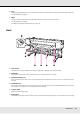
Slider (chip holder)
23 Alert lamp
This lamp lights or flashes when an error occurs.
On/flashing
:
An error has occurred; the type of error is indicated by how the lamp lights or flashes. Check the message on
the control panel’s screen.
Off : No error.
24 Control panel
See “Control Panel” on page 15.
25 Front cover
Open when loading media, cleaning the inside of the printer, or removing jammed media. Normally closed when using the
printer.
1Slider
Attach the chip unit included with the ink pack before refilling the ink.
See “Chip Unit Replacement and Ink Refills” on page 98.
2Ink inlet cover
Open this cover to refill the ink tank with ink.
3Chip unit
A unit that includes an IC chip.
This is included with the ink pack.