Operation Manual
Manuals
Brands
Epson Manuals
Photo Printer
StylusPhotoR2400
341
342
343
344
345
346
347
348
349
350
350
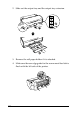
2.
Slide out
the output tr
ay and the o
utput tr
ay extension.
3.
R
emov
e the ro
ll pap
er ho
lder i
f it is a
ttache
d.
4.
Make sure the r
ear edge
guide for the rear
manual feed sl
ot is
flus
h with t
he left s
ide of th
e pri
nter.
1
...
...
348
349
350
351
352
...
...
392