
Operation Manual



170
EPSON Printer Utility
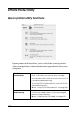
Epson printer utility functions
Epson printer utilities allow you to check the current printer
status and perform certain maintenance procedures from your
computer.
EPSON
StatusMonitor
Monitors the printer status. If it detects a printer
error, it will inform you with an error message.
You can also use this utility to check how much ink
is remaining before printing.
To use the EPSON StatusMonitor, click the EPSON
StatusMonitor button.
& See “Using EPSON StatusMonitor” on page 240
Auto Nozzle Check
and Cleaning
Prints nozzle check pattern and automatically
checks print head nozzles. If they are clogged,
performs head cleaning.
& See “Cleaning the Print Head” on page 252