
Operation Manual





11-24 Maintenance
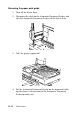
3. Open the maintenance cover and lock the scanner carriage.
4. Close the maintenance and document covers.
5. Unplug the power cord from the electrical outlet; then
disconnect the interface cable.
6. Remove all paper from the sheet feeder, and then remove the
paper supports.
7. Push in the output extension tray.