Operation Manual
Manuals
Brands
Epson Manuals
Printer
Stylus Scan 2500
211
212
213
214
215
216
217
218
219
220
Maintenance
11-2
1
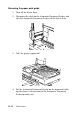
3.
Slowly pul
l the jammed paper out
of the feeder mecha
nism.
(Be careful not
to pull
too hard; t
he paper
may tear, maki
ng
it mo
re dif
ficu
lt to rem
ove
.)
4.
If paper is sti
ll jammed insi
de the mechan
ism, open the cover
to remove it
.
1
...
...
215
216
217
218
219
...
...
288