
Operation Manual



10-12 Replacing Ink Cartridges
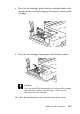
8. Press the load/eject button again. The Stylus Scan moves
the print head back to its home position and charges ink in
the system.
Caution:
The Operate light continues to flash while the Stylus Scan
performs the ink charging operation. Never turn off the
Stylus Scan while the Operate light is flashing. Doing so can
result in incomplete charging of ink.