
Operation Manual






9-20 Copier
Document Type
Select the type that matches the original document that you are
copying.
Note:
For types of Text, Photo, and Mixed Document, the default settings
contain with both B/W and color settings. So when you change the
content of the B&W/Color column, it remains as the same default
document type.
Making other basic settings
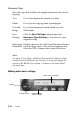
Text Use if your document contains text only.
Photo Use if you are copying from a photograph.
Text and
Image
Use if your document includes both text and
illustrations.
Save
Settings
Click the Save Settings button to open the
Document Type Setting list. You can save your
original setting.
Multi-page
Document
Enables you to use the ADF (Auto Document Feeder)
for multi-page copies. This selection appears only
when the ADF is connected to your Stylus Scan.
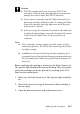
scaling setting
reduce/enlarge
custom setting
shows current settings
scaling