
Operation Manual


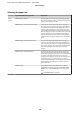



Parameter A B-L B-R C
TOP/
BOTTOM
15mm
15mm 3mm 3mm 15mm
TOP35/
BOTTOM
15mm
35mm 3mm 3mm 15mm
TOP45/
BOTTOM
15mm
45mm 3mm 3mm 15mm
15mm 15mm 15mm 15mm 15mm
3mm 3mm 3mm 3mm 3mm
Note:
❏ The print area does not change even when the
margins are changed.
❏ The printer automatically detects the dimensions
of the paper that is loaded. Print data that
exceeds the printable area of the paper cannot be
printed.
❏ When the same data is printed with a 3-mm
margin and a 15-mm margin and compared, you
may notice that part of the right side of the
15-mm margin image is not printed.
Epson Stylus Pro 7700/7710/9700/9710 User’s Guide
Paper Handling
51