
Operation Manual





Exporting or Importing
You can export or import the settings you have
registered as a file.
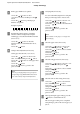
Exporting the settings
A
Open the Save or Deletes Select Settings dialog
box or the Saves or deletes Custom Media
dialog box.
B
Select the setting in the List box, and click
Export.
C
Select the location, and enter the file name, and
then click Save.
Importing the settings
A
Open the Save or Deletes Select Settings dialog
box or the Saves or deletes Custom Media
dialog box.
B
Click Import.
C
Select the file you want to import, and then
click Open.
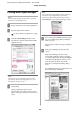
Exporting or importing all settings
You can export or import the all of the printer driver
settings as a file.
A
Click the Utility tab, and then click Export or
Import.
B
Click Export or Import.
C
To export the setting, enter the file name and
then click Save. To import the setting, select the
file you want to import and then click Open.
Epson Stylus Pro 7700/7710/9700/9710 User’s Guide
Variety of Printings
156