
Basic Operation Guide Printer RX700

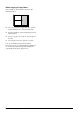


Table Of Contents
- Safety Instructions
- Using the Control Panel
- Basic Copying
- Copying on CD/DVD
- Printing Directly from a Memory Card - Basic Printing
- Printing Directly from a Memory Card - Printing Options
- Printing a Single Photo
- Printing Multiple Photos onto One Sheet
- Printing Enlarged Images
- Printing Photo Stickers
- Printing on CD/DVD
- Printing a CD Jacket
- Printing on EPSON Iron-On Cool Peel Transfer Paper
- Printing Using a Combo Printing Sheet
- Printing with DPOF Functions
- Printing with Photo Frames
- Changing Print Settings
- Printing from Film
- Scanning to a Memory Card
- Printing Directly from a Digital Camera
- Printing Directly from an External Device
- Replacing Ink Cartridges
- Maintenance and Transporting
- Troubleshooting
- Customer Support
- Product Specifications
- Summary of Panel Settings
- Index

12 Basic Copying
When copying in Copy Photo
Place each photo horizontally as shown in the
illustration below.
❏ You can copy photos bigger than 64 ×
89 mm,
and smaller than 127 × 178 mm inclusively.
❏ Position each photo at least 10 mm apart from its
adjacent photo.
❏ You can copy two 10 × 1 5 c m ( 4 × 6 in) size photos
at a time.
❏ You can place any sizes of photos at a time.
You can use the Restoration feature. When
Restoration is set to On in Print Settings, faded photos
or ones that have been changed by sunlight are
copied with nearly their original color.