
Service manual




EPSON Stylus Photo 870/1270 Revision B
Disassembly And Assembly Disassembly Procedures 84
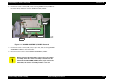
6. Remove the two screws (CBP, 3x8) securing SHIELD PLAT, PANEL to
the Panel Unit, and then remove SHIELD PLATE, PANEL.
Figure 4-7. BOARD ASSEMBLY, PANEL Removal
7. Remove the two screws (CBP, 3x8 / Cup P-Tite, 3x6) securing BOARD
ASSEMBLY PANEL to the Panel Unit.
8. Disconnect the harness from BOARD ASSEMBLY, PANEL.
CAUTION
When removing the Panel Unit, watch out for the stacker
assembly. Since the stacker assembly is attached to the
Panel Unit and HOUSING, PANEL, LEFT, if you remove the
Panel Unit, the stacker assembly will also come off.
BOARD ASSEMBLY, PANEL
CBP (3x8)
Harness
Cup P-Tite (3x6)
CBP (3x8)
CBP (3x8)
SHIELD PLATE, PANEL