
Service manual




EPSON Stylus Photo 870/1270 Revision B
Disassembly And Assembly Disassembly Procedures 83
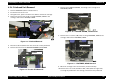
4.2.3 Panel Unit Removal
1. Remove HOUSING. (Refer to Section 4.2.1.)
2. Remove the harness for the Panel Unit from the frame in the printer
mechanism.
3. Remove the four screws (CBS, 3x6) securing the Panel Unit together
with HOUSING, REINFORCING, RIGHT to the printer mechanism.
4. Release the hook for the for HOUSING, REINFORCING, RIGHT from
the square cutout in the printer mechanism.
5. Release the pins fit in the printer mechanism, and then remove the
Panel Unit along with HOUSING, REINFORCING, RIGHT.
Figure 4-6. Panel Unit Removal
CHECK
PO INT
When installing the harness to the printer mechanism, be
sure to stick it along the marking line on the frame.
Harness
Marking Line
HOUSING,
REINFORCING, RIGHT
Cutout
CBS (3x6)
CBS (3x6)
Pins
Panel Unit