
Service manual




EPSON Stylus Photo 870/1270 Revision B
TROUBLESHOOTING Overview 69
3.1.3 Isolating the Faulty Part according to the Phenomenon
Refer to this section if you could not solve the problem in Section 3.1.1.1
or Section 3.1.2 or need more information to isolate the cause according
to the exhibited phenomenon. This section mostly covers the problems
relating to the main control circuit and other parts.
Table 3-11. Phenomenons Exhibited
No. Phenomenon Exhibited Table to refer to
1 CR motor does not rotate. Table 3-12
2 PF motor does not rotate. Table 3-13
3 Pump/ASF motor does not rotate. Table 3-14
4 Cleaning does not solve the print
problem.
Table 3-15
Table 3-12. CR Motor does not Work
Step Checkpoint
Action
1 Getting ready
for checking
waveforms.
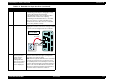
Using an oscilloscope, check the outputwaveform at
CN14 (CR motor connector) on the main board. For
checking, press the Load/Eject button to drive the CR
motor.
NOTE:
Be sure to disconnect the CR motor cable.
NOTE:
Ground one of the probes to the frame. The
connector itself has no ground line since the
CR motor is a bi-polar motor.
2 Checking the
waveforms to
solve the
problem.
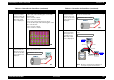
Drive the CR motor and check that the waveform
shown below is output from each pin of CN14.
• If the waveform appears as shown, replace the CR
motor.
• If not, replace the main control board or the CR
motor driver IC (IC18).
20V
20
µ