
Service manual




EPSON Stylus Photo 870/1270 Revision B
TROUBLESHOOTING Overview 64
3.1.1.7 Remedies for Fatal Error
A fatal error is basically caused by any of the following conditions:
!
The printer fails to detect the CR home position.
!
The printer fails to detect signals from the linear scale.
!
The ASF sensor fails to detect the ASF home position.
The following table shows various causes of the fatal error and
corresponding solutions. Be sure to follow the steps correctly to
troubleshoot the fatal error.
NOTE:
If the exhibited problem is similar to a problem listed under
“Problem”, take the actions in the right column. If not, proceed to the
next step.
Table 3-9. Remedies for Fatal Error
Step Problem Check & Actions
1 The printer is
powered on and the
CR unit leaves its
home position and
then collides with
the right/left frame.
After that, a fatal
error is displayed.
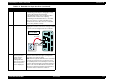
Check the linear encoder board visually for the
following:
• Is the linear encoder board properly installed
to the carriage? If not, install it properly.
• Is the encoder FFC connected to the connector?
If not, connect it properly.
2 Ditto
• Check that the linear encoder belt passes
through the slot in the sensor.
• Check that the sensor is free from dust and
paper debris.
Linear Encoder Board
3 When the Printer is
turned on, the CR
moves a little and
you hear the ASF
Hopper moving.
After that, a fatal
error is displayed.
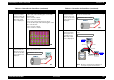
• Referring to the figure below, check that the
ASF sensor is attached to the correct position.
• Check that both connectors 1 and 2 are
securely connected.
4 Ditto Turn the printer on and check for the correct
voltages at the pins shown in the figure below:
Table 3-9. Remedies for Fatal Error (continued)
Step Problem Check & Actions
ASF Sensor
ASF Frame (Left)
Connector 1
Connector 2
Control
Board
To Pin 3
(ASFV)
To Pin 2
(GND)
CN6
• When the ASF HP detector wheel is in home
position, the voltage is 0.7 V or less.
• When the ASF HP detector wheel is out of
home position, the voltage is 2.4 V or more.