
Service manual




EPSON Stylus Photo 870/1270 Revision B
TROUBLESHOOTING Overview 61
Ditto Ditto
• Using your hand, move the actuator as if it
were being pushed by incoming paper. Then
release the actuator and check if it
automatically returns to its original position
with the tension of the torsion spring.
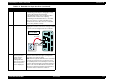
• Referring to the illustration above, check that
the sensor base is securely installed to the
frame. If the sensor base is loose or installed
insecurely, instal it securely.
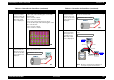
3 Ditto Check if the PE sensor is defective. Manually
toggling the actuator, measure the voltage at CN6/
Pin 3. The correct voltage levels are as follows:
4 The Load/Eject
button is pressed
and the hopper
appears to be
working OK. But
paper is not loaded.
Then a Paper Out
error is displayed.
Hand-rotate the shaft in the ASF in the paper feed
direction and check if the hopper springs back
every time you rotate the shaft.
NOTE:
Even though the ASF HP sensor is working
properly, the hopper does not load paper if it is
not operating at the correct timing. To solve that
problem, disassemble and reassemble the ASF or
replace it. In case the ASF HP sensor detects the
ASF home position during paper feed sequence,
the printer enters a fatal error condition.
Table 3-5. Remedies for Paper Out Error (continued)
Step Problem Check & Actions
M/C
M/C
CRH
PE ASF
RED
WHT
BLK
M/C
Pin 3 (PE)
Pin 2 (GND)
tr04
Paper present: LOW
Paper out: HIGH