
Service manual



EPSON Stylus Photo 870/1270 Revision B
ADJUSTMENT Adjustment 132
5.2.8 USB ID check/input
You are required to perform
USB ID check/input
whenever you replace
the main board.
The Stylus Photo 870/1270 is equipped with the USB interface as
standard. In the Windows 98 or iMAC environment, the USB port driver
controls its device using the USB ID stored in EEPROM. Therefore, you
need to input a unique USB ID for a new main board.
A USB ID, a 18-digit character string, is stored in a specific address of
EEPROM. At factory, it is built up as shown below:
!
Factory product line number... 3 digits
!
PC number... 2 digits
!
Year/month/date... 12 digits (Time data in the PC is assigned.)
!
“0”... 1 digit
During a repair service, a new USB ID is formed with a 10-digit product
serial number and the rest (8-digit) produced by the service program. You
need to input the new USB ID in EEPROM.
5.2.8.1 Inputting/Checking the USB ID
1. Starts the service program and get to the main menu.
2. Select
USB ID check/input.
The USB ID check/input window appears.
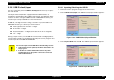
Figure 5-24. USB ID Check/Input Window
3. Select
Input USB ID
and click
OK
. The USB ID input window appears.
Figure 5-25. USB ID Input Window
CAUTION
You need to input a new USB ID for the following reasons:
1. If the main board is replaced, the ID for the board is no
longer good.
2. If the ID is in conflict with an ID used for any other
peripheral devices, the printer can not be connected
with a USB interface.