
Service manual



EPSON Stylus Photo 870/1270 Revision B
ADJUSTMENT Adjustment 125
If you need to check for the model name you have input, select
Check this
model name
and click
OK
. The printer is reset and displays the model
name.
5. To exit the program, click
Continue
repeatedly or press the
ESC
key to
return to the initial window, and then click
Quit
. You see the small quit
window, where click
OK
to exit the program.
5.2.4 Market destination check
Using this function, you can check that the correct destination is stored in
EEPROM on the main board by reading the model name. The destination
information includes the model name as well as the CG setting and TOP
margin. Since the model name is used as the device ID in the bidirectional
communication, if a wrong destination is selected, the device ID for the
printer is not incorrectly recognized.
1. Start the service program and get to the main menu.
2. Select
Market destination check
from the adjustment menu and click
OK
. You see the Market destination check window.
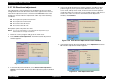
Figure 5-10. Market Destination Check Window Sample
3. Click
OK
in the window. The destination appears in the small window
as in the example in Figure 5-10.
NOTE:
To continue to the next adjustment, select any other adjustment item
from the menu.