
User Setup Information
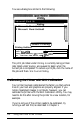

You see a dialog box similar to the following:
Printing
Waiting
1 Microsoft Word-Untitled2
2 Microsoft Word-Untitled3
I Cancel Printing
1
Printing Untitled1
One page remaining.
Page Printing :
Driver :
StylusCOLOR
Printing Status: Processing
job>>
sending
data...(H2m)
User :
Print Time : Wed, Mar 22, 1995
5:47
PM
I
The print job listed under Printing is currently being printed.
Jobs listed under Waiting are queued to begin when the
current job is completed. To cancel a print job, click the name of
the job and then click Cancel Printing.
Calibrating the Printer with Bi-D Calibration
Your printer has been calibrated at the factory so that vertical
lines in your text and graphics are properly aligned. If you
notice misaligned images in printouts, however, you can
calibrate the printer with the Bi-D Calibration Utility. You may
need to do this after moving the printer to a new location, for
example.
If you’re not sure if the printer needs to be calibrated, try
running a self test first, as described in Chapter 1.
3-2
Using the Printer Driver Utilities