
User Setup Information

Selecting Paper Size and Orientation Using Page Setup
By default, the printer expects letter-size (8.5 x 11 inches)
paper. To select a different paper size, choose Page Setup in
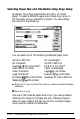
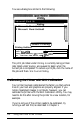
the File menu of your application program. You see a dialog
box similar to the following:
You can select one of the following predefined paper sizes:
A4 (210 x 297 mm)
A4 (Landscape)*
A4 (Centered)
A3 (297 x 420 mm)
Super
A3/B
(13 x 19 inches)**
US B (11 x 17 inches**
Letter (8% x 11 inches)
Letter (Landscape)
Letter (Centered)
Legal
(8%
x 14 inches)
Legal (Centered)
Executive
(7%
x 10 inches)
Envelope
#lO
(4% x 9% inches)
Envelope DL (110 x 220 mm)
Statement
(5%
x 8% inches)
*
Stylus Pro XL only; for Stylus Pro, use your software to select landscape
orientation.
**
Stylus Pro XL only.
Use one of the Centered paper sizes only if you have problems
centering the image on the page and your software program
does not have a setting that lets you do this. Centered images
have a slightly smaller printable area.
2-14
Installing and Using the Printer Driver