
User Setup Information


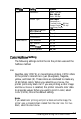

Box
title
I
Print
Setttng
Resolution
Options
Super -720 dpi
Best -360 dpi
Draft -180 dpi
Media Type
Plain Paper
Transparency
Coated Paper
-
360 dpi,
Coated Paper
-
720 dpi
HQ
Glossy Paper
MicroWeave
Mode
On, off
High Speed Mode
Finest Detail
On,
off
On, off
Visual Effects
Flip Horizontal
Flip Vertical
Invert ImaRe
On, off
On, off
On, off
Screen pattern
On, off
Color/Hallftone
Setting
The following settings control the ink the printer uses and the
halftone method.
Inks
Specifies color (CMYK) or monochrome printing. CMYK refers
to the printer’s colored inks: cyan (blue-green), magenta,
yellow, and black (K). These colors are combined to create any
of 16 million colors. When you select Monochrome, the
printer prints only black ink. If you are printing a color image
and Monochrome is selected, the printer converts color data
to grayscale values. When you want to print in color, select
Color (CMYK); this is the default setting.
Note:
lf you
select
color printing and print a black and white image, the
printer uses a composite black created from the color inks. For true
black, select
Monochrome.
Installing and Using the Printer Driver
2-9