
User Setup Information


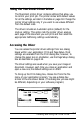
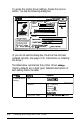

To access the printer driver settings, choose the Options
button. You see the following dialog box:
,Color
/
Halftone
Settina------
Inks:
[
Color KMY&
-1
Method:
Automatic
T
f
light
Dark
r
Print
I
[
Cancel
[Help
It
q
Screen pattern
q
High Speed Mode
(If you do not see this dialog box, the driver has not been
installed correctly. See page 2-l for instructions on installing
the driver.)
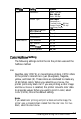
The table below
s
ummarizes
the printer driver
settings.
(Factory defaults are in bold type.) Detailed descriptions of
each setting follow the table.
Box
title
semng
I Options
Color/Halftone
Setting
inks
Color(CMY
K)
Monochrome
Method
No halftoning
Dithering A
Dithering
B
Error Diffusion
Automonc
Light/Dark slider
tightest
-
Medium
-
Darkest
1
2-8
Installing and Using the Printer Driver