
User Setup Information


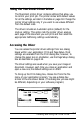

If the wrong printer is shown, the printer may be turned off
or not connected properly. Turn on the printer, if necessary,
and check the connections; then click RETRY. If the printer
name is still wrong, change the port selection on the
Chooser window and repeat steps 2 through 6.
7.
If you wish, turn on background printing by clicking the
button so you can print in the background while using your
Macintosh for other tasks. (You must turn on background
printing to use the Epson Monitor2 utility to manage print
jobs, as described in Chapter 3.)
Note:
Your
system
must have at least 8MB of RAM to use background
printing. Background printing slows the print speed and may
also slow down any software program you use while printing in
the background.
8.
Close the Chooser. You see a reminder message to change
the printer in your applications. Click OK.
Note:
You may want to calibrate the printer before you print using the
driver; see Chapter
3jbr
instructions.
Selecting the Network Type
If you’re installing the printer on a LocalTalk or EtherTalk
network, you need to select the network type. Follow these steps:
1.
Turn on your Macintosh. Under
the
Apple menu,
choose
Control Panels.
2.
Double-click the Network icon.
3.
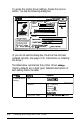
In the dialog box that appears, choose LocalTalk or
EtherTalk.
2-6
Installing and Using the Printer Driver