
User Setup Information







Connecting the Printer to Your Macintosh
Follow this procedure only if you are connecting the printer to
the Macintosh using the serial interface. If you are connecting
to a network, see Appendix A of the
Reference Guide.
For the
serial interface, you need to obtain an Apple System/
Peripheral-8 cable (part number M0197) or equivalent.
Note:
The printer also has a parallel port, which is standard for most PCs
but is not used by the Macintosh.
1.
Make sure both your printer and Macintosh are turned off.
2.
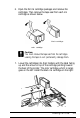
Connect one end of the interface cable to the serial connector
on the back of the printer.
1-16
Installing the Printer