
User Setup Information







Be sure to install both ink cartridges. The printer will not
work if only one cartridge is installed.
8.
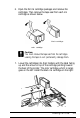
Push down the ink cartridge clamps until they lock in place.
Caution:
Once you install the ink cartridges, do not open the clamps
or remove the cartridges except to replace them with new
ones. Once you remove a cartridge, do not reuse it; this
may damage the print head.
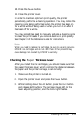
9. Press the Alt button again to return the print head to its
home position. (Even if you do not press Alt, the print head
moves back to its home position about 60 seconds after you
close the clamps.)
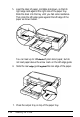
After you install the ink cartridges, the printer charges the ink
delivery system. This takes about one minute. During this
time, the Pause light flashes. When the printer is finished
charging, the Pause light stays on without flashing.
Caution:
Never turn off the printer while the
Pause
light is
flashing.
1-10
Installing the Printer