
User Setup Information







3.
Press the Pause button. Make sure the Pause light on the
control panel comes on.
4.
Hold down the Alt button for about five seconds until the
print head moves slightly left, to the the ink cartridge
install position. The Pause light begins flashing.
5.
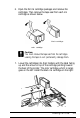
Pull up each of the ink cartridge clamps to open them.
1-8
Installing the Printer