
User Setup Information



3.
Plug the power cord into a properly grounded electrical
outlet.
4.
Turn on the printer by pressing the Operate button. The
Pause light flashes while the printer initializes itself.
Installing the Ink Cartridges
Follow the steps below to install the printer’s ink cartridges.
Warning:
The ink cartridges are self-contained units. Under ordinary
use, ink will not leak from a cartridge.
If
ink gets on your
hands, wash them thoroughly with soap and water. If ink gets
into your eyes, flush them immediately with water.
Caution:
Do not open the ink cartridge packages until
just
before you
ins tall them or they may become too dry.
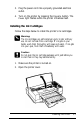
1.
Make sure the printer is turned on.
2.
Open the printer cover.
Installing the Printer
1-7