
Installation Instructions


R4C626Setup Guide
Rev_C
A5 size setup NO ARROWS.fm
9/8/00 Pass 0
R
Proof Sign-off:
Otsuka, CRE Moriyama_______
N.Nomoto _______
_______
Follow the instructions in the appropriate section below to install the printer
software. If you are DOS user, see “Printing with DOS” in the
Daily Use
guide.
For Windows 98, 95, 2000, and NT 4.0 users
Windows 98, 95, 2000, and NT 4.0 users must first install the printer
software, and then, if you are connecting via the USB port, check to ensure
that the USB cable is correctly installed. If you are connecting via the parallel
port, proceed to section
after installing the software.
Installing the software
Follow the steps below to install the printer software.
1. Make sure that your printer is off.
2. Turn on your computer and start Windows. If the New Hardware
Found screen or any other Wizard appears, click
Cancel
.
3. Insert the printer software CD that is shipped with your printer in the
CD-ROM drive. The Installer dialog box opens. (For floppy disk users,
insert the disk in the disk drive and double-click the
My Computer
icon, the floppy disk drive icon, and then
Setup.exe.
)
4. Select
Install Printer Driver/Utility
and click . Then, click
OK
in the
dialog box that appears to start the
printer software installation.
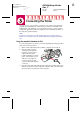
Note:
It is possible to install the Reference
Guide on your hard drive from the
Installer dialog box, as shown at the
right. To install the guide, select
Online
Guide
and then click . Then, click
Install Reference Guide
and follow
the on-screen instructions. When the
installation is complete, an
ESC880
Guide
icon appears in the EPSON folder. Double-click the icon to open the
guide.
5. Follow the on-screen instructions to turn on your printer.
For Windows 98 users, the printer port configuration starts
automatically.
For printers connected via USB cable, the USB device driver installation
starts automatically at this point. A message will appear asking you to
restart your computer. Follow this instruction.
Printed in Japan.xx-xx
Copyright© 2000 by SEIKO EPSON CORPORATION,
Nagano, Japan.