
Installation Instructions


R4C626Setup Guide
Rev_C
A5 size setup NO ARROWS.fm
9/8/00 Pass 0
L
Proof Sign-off:
Otsuka, CRE Moriyama_______
N.Nomoto _______
_______
Install the ink cartridges as described below.
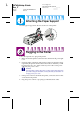
1. Lower the output tray and then
open the printer cover.
2. Press the
2
power
button to turn on the
printer.
The print head
moves left to the ink
cartridge installation
position. The
2
power light flashes
and the
*
and
)
ink
out lights come on.
?
Caution:
Do not move the print head by hand; doing so may damage the printer.
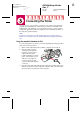
3. Lift up the ink cartridge clamps.
Note:
Do not remove the small sponges
that are attached to the ink
cartridge clamps.
4. Open the ink cartridge packages and remove only the yellow tape seals
from each cartridge.