
Operation Guide

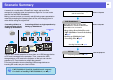


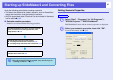


Table Of Contents
- Front Cover
- Contents
- EasyMP Summary
- Installing the Software
- Connecting with EMP NS Connection
- Convenient EMP NS Connection Functions
- Connecting to a Projector on a Different Sub-net
- Setting the EMP NS Connection Operation
- Using a Computer to Set Up, Monitor and Control Projectors
- Presentations Using PC Free
- Preparing a Scenario (Using EMP SlideMaker2)
- Appendix
- Copyrights and Trademarks

62
Scenario Summary
A scenario is a combination of PowerPoint, image, and movie files,
arranged in a projection order and saved as a single file. You can create
scenario files with EMP SlideMaker2.
Making a scenario allows you to easily and efficiently prepare presentation
material by extracting the necessary parts of files, and arranging them in
order without editing the original files.
Transfer the created scenarios to store them on a USB storage device
or SD card connected to the computer. Then, connect the USB
storage device or SD card to the projector so that you can use the
projector's PC Free function to project the scenario.
For more information about connecting USB storage devices or
inserting SD cards, see your User’s Guide.
q
EMP SlideMaker2 should be installed into the computer.
For details on installing EMP SlideMaker2, see
s
p.5
PowerPoint
file
Scenario file
Converting all files in a
single operation without
starting up SlideMaker2
Converting all files in a single operation b
y
starting up SlideMaker2
From a computer
From the projector
From a computer
Create the PowerPoint file, the image files,
and the movie files
There are two ways of using EMP
SlideMaker2 to convert a PowerPoint
presentation into a scenario.
• Drag & drop PowerPoint files to the
EMP SlideMaker2 icon on the desktop
s
p.65
• Starting up SlideMaker2 and
Converting Files
s
p.67
Sending Scenarios s p.75
Projecting Scenarios s p.56
EMP SlideMaker2
PC Free