
Operation Guide


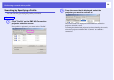


Table Of Contents
- Front Cover
- Contents
- EasyMP Summary
- Installing the Software
- Connecting with EMP NS Connection
- Convenient EMP NS Connection Functions
- Connecting to a Projector on a Different Sub-net
- Setting the EMP NS Connection Operation
- Using a Computer to Set Up, Monitor and Control Projectors
- Presentations Using PC Free
- Preparing a Scenario (Using EMP SlideMaker2)
- Appendix
- Copyrights and Trademarks

Performing a search with a profile
36
Searching by Specifying a Profile
You can search by specifying the profile you created.
A
Click "Profile" on the EMP NS Connection
projector selection screen.
If no profile is registered, you cannot select "Profile".
B
From the menu that is displayed, select the
projector you want to connect to.
The search results are displayed on the EMP NS Connection
projector selection screen.
Assuming that the desired projector has been found by the search,
select that projector and then click "Connect" to establish a
connection.
Procedure