
Operation Guide




Table Of Contents
- Front Cover
- Contents
- EasyMP Summary
- Installing the Software
- Connecting with EMP NS Connection
- Convenient EMP NS Connection Functions
- Connecting to a Projector on a Different Sub-net
- Setting the EMP NS Connection Operation
- Using a Computer to Set Up, Monitor and Control Projectors
- Presentations Using PC Free
- Preparing a Scenario (Using EMP SlideMaker2)
- Appendix
- Copyrights and Trademarks
Performing a search with a profile
37
Managing a Profile
You can change the name and the hierarchical structure of the profile.
A
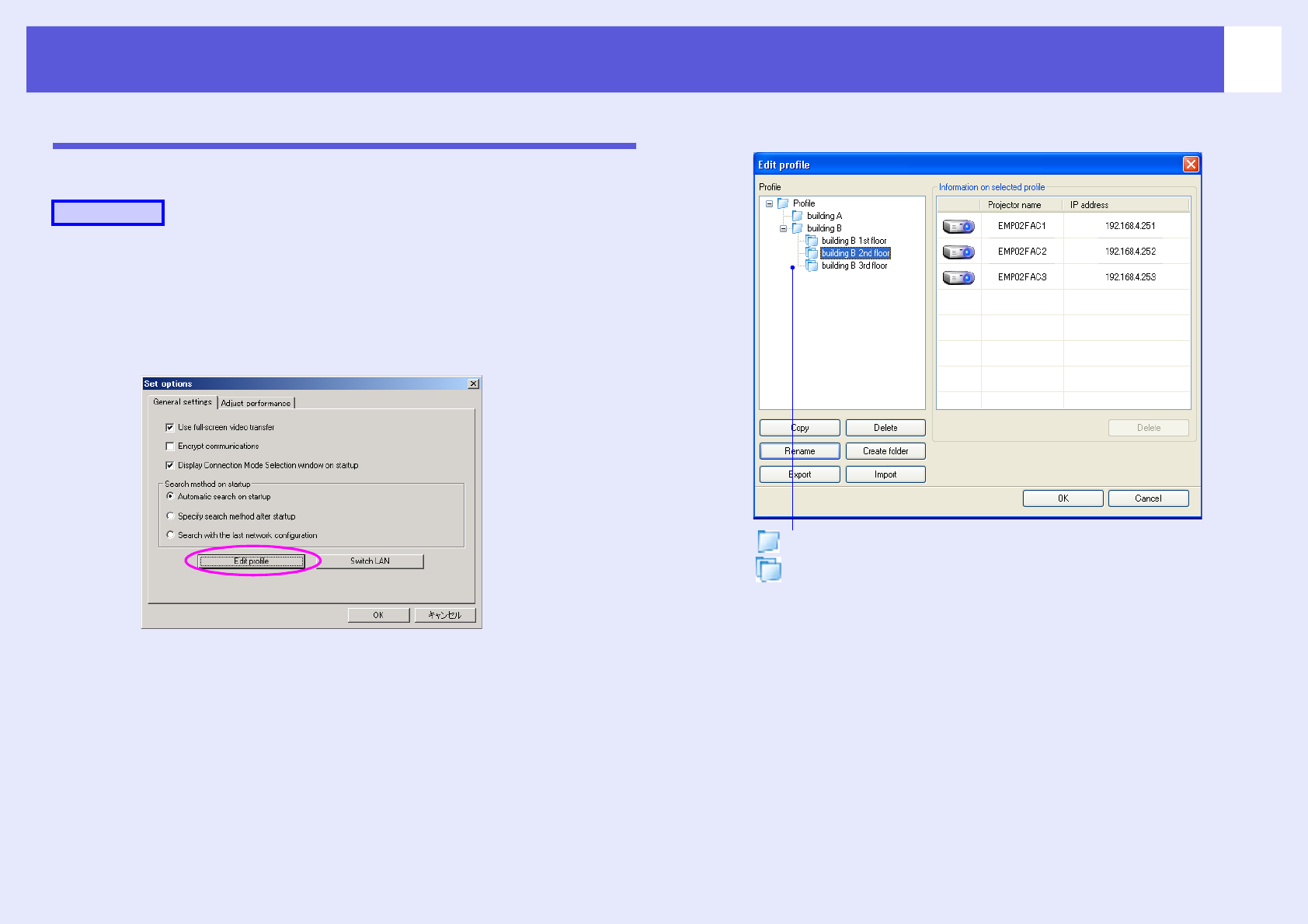
Click "Set options" on the EMP NS Connection's
main screen.
The "Set options" screen is displayed.
B
Click "Edit profile".
The "Edit profile" screen is displayed.
C
Edit the contents registered in the profile.
Procedure
: Indicates a folder.
: Indicates a profile.