
Using Guide


1
Installing Software and Connecting PictureMate
To connect PictureMate
®
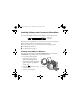
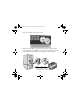
Deluxe Viewer Edition, you’ll need this cable:
If you don’t have a USB cable, you can buy one from your local computer
dealer or from Epson.
®
See the inside back cover for details.
When you’re ready to start, see the section for your computer system:
■ For Windows,
®
see below.
■ For Macintosh,
®
see page 9.
Installing PictureMate for Windows
First make sure PictureMate is NOT CONNECTED to your computer,
and REMOVE your memory card, if it’s inserted. Then:
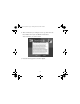
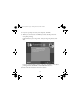
1. Load a sheet of PictureMate
Photo Paper, glossy side up,
against the right edge of the
paper feeder. Slide the edge guide
against the paper and open the
output tray.
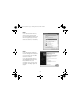
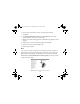
2. Press the
On button to turn
on PictureMate.
3. Turn on your computer.
Type A to B
USB cable
On button
Usingwcomputer.fm Page 1 Tuesday, March 29, 2005 3:48 PM