
Operation Manual



Loading Paper in the Paper Cassette 2
You can load almost any type of paper. We recommend loading A4 size plain paper as this is used frequently. If you
load the same paper in paper cassette 1 and select Cassette 1->2 as the Paper Source setting in the print settings,
the printer automatically feeds paper from paper cassette 2 when paper runs out in paper cassette 1.
Note:
When the output tray is ejected, check that there is no paper on the tray, and then close it by pressing the
button or
pushing it with your hand.
1. Raise the control panel.
2. Open the front cover until it clicks.
3. Check that the printer is not operating, and then pull out paper cassette 2.
4.
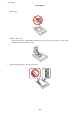
Slide the edge guides to their maximum position.
User's Guide
Loading Paper
28