
Operation Manual


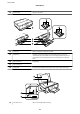


❏ Swipe a bit harder if the touch screen does not respond.
Displaying a Menu Appropriate to the Operation
e printer automatically displays menus appropriate to your operation as shown below. If you want to stop the
feature, disable the Auto Selection Mode setting.
Setup > Guide Functions > Auto Selection Mode
❏ Insert a memory card.
❏ Open the document cover to place an original.
Related Information
& “Menu Options for Guide Functions” on page 117
Entering Characters
To enter numbers, characters or symbols for network settings, use the keyboard on the LCD screen.
User's Guide
Printer Basics
19