
Operation Manual





Menu Description
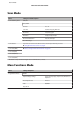
Disable Wi-Fi Network problems may be resolved by disabling or initializing the Wi-Fi settings, and then making
the settings again.
For details, see the online Network Guide.
Wi-Fi Direct Routerless
Setup
For details on the setting items, see the online Network Guide.
Setup Mode
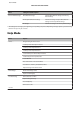
Menu Setting Item and Description
Ink Levels - Checks the status of ink cartridges.
Maintenance Nozzle Check Prints a nozzle check pattern to check the condition of
the print head.
Head Cleaning Cleans the print head to improve the condition of the
print head.
Print Head Alignment Adjusts the alignment of the print head.
Ink Cartridge(s) Replacement Replaces ink cartridges.
Printer Setup CD/DVD Adjusts the print position.
Stickers Adjusts the print position.
Thick Paper Turn on when printing on thick paper.
Sound Button Press, Error Notification, Volume
Quiet Mode Off, On
Screen Saver Off, Memory Card Data
Power Off Timer
& See “Using the control panel” on page 117
Sleep Timer
Clear All Settings
Basic Setup Language -
Wi-Fi/Network Settings Wi-Fi/Network Status You can see the Printer Name, current network
settings and you can also print a network status sheet.
Wi-Fi Setup See the online Network Guide. You can access the
Wi-Fi Setup menus directly by selecting Wi-Fi Setup
on the LCD screen.
Manual Wi-Fi/Network Setup
Wi-Fi/Network Connection Check You can check the network connection status, and
print the report. If there is any problem with the
connection, the report helps you find the solution.
User’s Guide
Menu List of Control Panel
95