
Operation Manual





Menu Setting and Options
Print on CD/DVD Print Layout CD/DVD 1-up, CD/DVD 4-up, CD/DVD Variety
Automatic Layout, Place Photos Manually
Browse Browse by Date, Cancel Browse
Select Location Select Folder
Photo Adjustments
Enhance, Scene Detection, Fix Red-Eye
*2
, Brightness,
Sharpness, Saturation
Filter Off, Sepia, B&W
Crop/Zoom
Print on a CD/DVD, Test Print on A4 paper
Print Settings CD Density
Personal Stationery Lined Papers Wide Rule, Thin Rule, Graph Rule, Music Paper
Writing Papers Horizontal Rule, Vertical Rule, Without Rule
Calendar Weekly, Monthly
Message Card Plain Paper, Matte
Origami Origami Envelope, Origami Envelope Instruction
& “Printing origami envelopes” on page 88
Coloring Book Photo or Drawing on Scanner Glass, Photo on Memory Card
Browse Browse by Date, Cancel Browse
Select Location Select Folder
Print Settings Paper Settings, Paper Source, Density, Line Detection
*1Your image is slightly enlarged and cropped to fill the sheet of paper. Print quality may decline in the top and bottom areas of the
printout, or the area may be smeared when printing.
*2This setting does not change your original image. It only affects your printout. Depending on the type of photo, parts of the image
other than the eyes may be corrected.
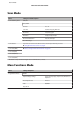
Wi-Fi Setup Mode
Menu Description
Wi-Fi/Network Status For details on the setting items, see the online Network Guide.
Wi-Fi Setup Wizard
Push Button Setup (WPS)
PIN Code Setup (WPS)
Wi-Fi Auto Connect
User’s Guide
Menu List of Control Panel
94