
Operation Manual





Scan Mode
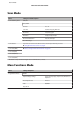
Menu Setting item and Description
Scan to Memory Card JPG, PDF
Color, B&W
Contrast -4 to +4
Scan Area A4, Auto Cropping, Max Area
Document Text, Photograph
Resolution 200dpi, 300dpi, 600dpi
Document Orientation Portrait, Landscape
Clear All Settings
Scan to Cloud If you want to use the Scan to Cloud service, visit the Epson Connect portal site.
& “Using Epson Connect Service” on page 8
Scan to PC (JPEG)
& “Basic Scanning from the Control Panel” on page 67
Scan to PC (PDF)
Scan to PC (Email)
Scan to PC (WSD)
*
* This feature is only available for English versions of Windows 8, 7 or Vista.
More Functions Mode
Menu Setting and Options
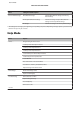
Copy/Restore Photos Off, On
Paper and Copy Settings
Paper Size, Paper Type, Paper Source, Borderless
*1
,
Expansion
Photo Adjustments Enhance
Filter Off, B&W
Crop/Zoom
User’s Guide
Menu List of Control Panel
92