
Operation Manual



F
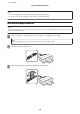
Slide the edge guides to the edges of the paper.
G
Keep the cassette flat and insert it back into the product carefully and slowly.
Note:
❏ Leave enough space in front of the product for the paper to be fully ejected.
❏ Do not remove or insert the paper cassette while the product is operating.
Into the paper cassette 2
A
Open the front cover.
Note:
If the output tray has been ejected, close it before pulling out the paper cassette.
User’s Guide
Paper and Media Handling
26