
Operation Manual


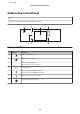


Using the LCD screen
a
b
c
a Displays the screen name.
b Displays the status of the product.
See the Help Mode for more information on the icons displayed on the LCD screen.
Help > Icon List
You can display related menus or information by tapping the icons.
c You can scroll the screen by swiping the LCD screen while an arrow is displayed on the right-hand side of the screen. Try
swiping a bit harder if the touchscreen is slow to respond.
About Auto Selection Mode
Auto Selection Mode displays menus according to your actions.
Note:
❏ When you insert a memory card or open the document cover, the LCD screen may not display the desired menu. In this
case, press
to display the Home menu.
❏ To disable this function, turn off each item in the Auto Selection Mode menu. Setup > Guide Functions > Auto
Selection Mode.
User’s Guide
Getting to Know Your Product
18