
Setup Guide Color Image Scanner




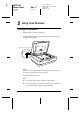

Table Of Contents

8 Setting Up the Scanner
L
R4CD180
Setup Guide Rev. C
SETUP.FM A5 size
12/18/03
Proof Sign-off:
KOW N.Mizuno S.Koide
H.Kimura
NOC K. Lee
4
Setting Up the Scanner
Choosing a Place for the Scanner
Follow the guidelines below when selecting a location for your
scanner.
❏ Place the scanner on a flat, stable surface. The scanner does
not operate properly if it is tilted at an angle.
❏ Place the scanner close enough to the computer for the
interface cable to reach it easily.
❏ Place the scanner near an electrical outlet where the power
cord can be easily unplugged.
❏ Keep the scanner away from high temperature, humidity and
excessive dirt or dust. Also avoid using or storing the scanner
in places subject to rapid changes of temperature and
humidity.
❏ Keep the scanner away from direct sunlight and strong light
sources.
❏ Avoid places subject to shocks and vibrations.