
Quick Guide



4 About Your Product
■
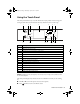
Press x Menu to make special settings. The touch panel retains the settings from the
last time it was used. If you want to start over, simply press
Reset to clear settings for
the mode you’re using.
■ The blue status light at the bottom of the touch panel flashes when the product is
printing or performing routine maintenance. If it flashes rapidly, check the product
for error messages.
Tip: To turn off the “beep” heard when you press a button, or to reduce its
volume, press Setup > Printer Setup > Sound, and adjust one of the
settings. If you turn off the sound, the dialing sound made when you transmit a fax
is also turned off.
You may see the following icons on the screen:
Icon Meaning
The product is connected to a wired network.
The product is connected to a wireless network.
ADF A document is loaded in the automatic document feeder.
Reminds you whether View Auto Correct is on or off.
Art837QG.book Page 4 Wednesday, April 27, 2011 4:07 PM