
Quick Guide
8 Copying a Document or Photo
■
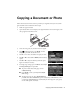
Select your Paper Type.
■ For the Document Type setting, choose Text for plain documents or
Text & Image if your document contains photos or graphics.
■ To change the copy quality, select Quality, press OK, then choose Draft,
Standard Quality, or Best.
Note: To clear previously used copy settings, press y Stop/Reset. For more
information about copy settings, see your online User’s Guide.
9. Press x Start to begin copying. To cancel copying, press y Stop/Reset.