Dot Matrix Printer User's Manual DFX-5000
Manuals
Brands
Epson Manuals
Printer
DFX-5000
71
72
73
74
75
76
77
78
79
80
5.
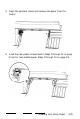
Open the sprocket covers and remove the paper from the
tractor.
6.
Load the new paper as described in Steps 1 through 13 on page
2-3 (or for rear-loaded paper, Steps 1 through 15 on page 2-9).
Loading and Using Paper
2-29
1
...
...
70
71
72
73
74
...
...
229