
Specifications




EPL-5700 Chapter3 Troubleshooting
Rev. A
3-1
3
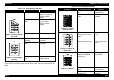
Table 3-19. Print Quality Problems
Symptom Possible Cause Solution
Back of the paper is dirty. Fusing roller is dirty. *Exchange the fusing
roller or fusing unit.
(Refer to
Note*
below)
Transfer roller is
dirty.
*Exchange the
transfer roller.
(Refer to
Note*
below)
Figure 3-5. Dirty spot on
the back.
Paper path is dirty. Clean the paper path.
Low image density. No toner in the toner
cartridge.
Exchange the toner
cartridge.
End of life of OPC
drum.
Exchange the drum
cartridge.
Figure 3-6. Low image
density.
Defective developing
bias.
Exchange the high
voltage board.
Note*
) Since the life span of the fusing unit and the transfer roller are same,
if you need to exchange either one of them, make sure to exchange both of
them.
Table 3-20. Print Quality Problems
Symptom Possible Cause Solution
Foggy background. Defective developing
bias.
Exchange the high
voltage board.
Figure 3-7. Foggy
background.
End of life of OPC
drum
Exchange drum
cartridge.
White line, Black line
Figure 3-8. White or
black line.
There is scar or
damage on the OPC
drum.
Abnormal print head.
Exchange the OPC
drum.
Exchange the print
head.
Offset image Defective fusing roller.
(Abnormal 200M Ω
resistance)
Exchange the
fusing roller.*
Figure 3-9. Offset.
Defective transfer
roller.
Exchange the
transfer roller.*
Defective OPC drum,
or end of life.
Exchange the drum
cartridge.