
Specifications




EPL-5700 Chapter3 Troubleshooting
Rev. A
3-
5
Memory Overflow
The printer has insufficient memory available for the current task.
If “Auto Cont” on the panel setting is set off(refer to page1-10), Press
the Continue switch on the control panel. If the error occurs because
the current task data exceeds the buffer capacity, the printer prints
out the page forcibly, which was made before the error occurs. If the
errors occurs because of failing to register particular fonts, or micro-
pattern, the printer ignores those command and continue processing.
If “Auto Cont” on the panel setting is set on(refer to page1-10), this
error is canceled automatically after a while. If the error occurs
because the current task data exceeds the buffer capacity, the printer
prints out the page forcibly, which was made before the error occurs.
If the errors occurs because of failing to register particular fonts, or
micro-pattern, the printer ignores those command and continue
processing.
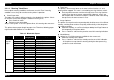
Refer to table below for recommended memory module, if you need to
add more memory.
Table 3-6. Memory Module
RAM Capacity Function
No RAM installation Printing up to 600dpi is
possible.
4MB installation Printing is possible in all printing
conditions
Print Overrun
The required time to process the print data exceeds the print engine speed
because the current page is too complex.
Turn on “Page Protect” on the printer setting dialog of the panel menu
of your printer driver, or use the remote control panel to change this
setting.
If “Auto Cont” on the panel setting is set off(refer to page1-10), Press
the Continue switch on the control panel.
•If there is no memory capacity, or if error occurs again, the printer
erase that data and goes to the next page.
•Perform reset or warm boot.
If “Auto Cont” on the panel setting is set on(refer to page1-10), this
error is canceled automatically after a while. After the error is
canceled, if there is memory capacity, the printer tries to print that
data one time. However, If there is no memory capacity, or if error
occurs again, the printer erase that data and goes to the next page.
Service Req. Error
A controller error or a print engine error has been detected.
Turn off the printer, and wait at least five seconds then turn it back on.
If this message still occurs, refer to section 3.3.1.4 Service Call Error.