- EPSON Monitor User's Guide C82357
Manuals
Brands
Epson Manuals
Monitor
C82357
41
42
43
44
45
46
47
48
49
50
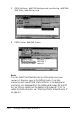
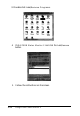
3. Double-click
Add/Remove Programs.
4.
Click
EPSON Status Monitor 2
and click the
Add/Remove
button.
5.
Follow the instructions on the screen.
2-22
Using EPSON Status Monitor 2
1
...
...
43
44
45
46
47
...
...
57