
User manual






Hold the
y
button down until the ink cartridge holder moves to the icon. You cannot replace cartridges
in this position. Go to the next step.
Note:
To cancel ink cartridge replacement, keep the ink cartridges installed and turn o the printer.
3. Press the
y
button again.
e ink cartridge holder moves to the replacement position.
4. When replacing the black ink cartridge, gently shake the new black ink cartridge four or ve times and then
remove it from its package. When replacing other color cartridges, remove the new color cartridges from their
package without shaking.
c
Important:
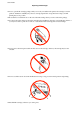
Do not shake cartridges
aer
opening the package, as they may leak.
User's Guide
Replacing Ink Cartridges
70