
User manual




A
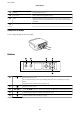
Ink cartridge holder Install the ink cartridges. Ink is ejected from the print head nozzles
underneath.
B
Scanner unit Scans placed originals. Open to replace ink cartridges or to remove jammed
paper. This unit should usually be kept closed.
C
Memory card slot Insert a memory card.
D
Control Panel Operates the printer.
A
Document cover Blocks external light while scanning.
B
Scanner glass Place the originals.
User's Guide
Printer Basics
14