
User manual






Installing Ink Cartridges
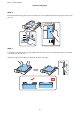
Step. 1
Open the front cover.
Step. 2
Remove all ink cartridges from their packaging. Shake the ink cartridge for 5 seconds 15 times horizontally in
approximately 10 cm movements.
❏ For the initial setup, make sure you use the ink cartridges that came with this printer. These cartridges cannot
be saved for later use.
❏ Do not touch the green chip on the side of the cartridge.
Step. 3
Insert all four cartridges. Press each one until it clicks.
Epson NPD4937-00 EN
Hardware Setup Guide
5